目录背景
研发工作中难免会遇到一些奇奇怪怪的需求,就比如最近,客户提了个新需求:上传一个WORD文档,要求通过系统把该文档转换成PDF和TXT。客户的需求是没得商量的,必须实现!承载着客户的期望,我开始在网上找相关的资料。没曾想,还真有开源的依赖专门处理这类问题,咱们一起来看看吧!
实践
1、下载和引入Jar包
要实现WORD到PDF/TXT的转换,需要引入以下几个Jar包:
- <dependency>
- <groupId>com.aspose</groupId>
- <artifactId>aspose-words</artifactId>
- <version>19.1</version>
- <scope>system</scope>
- <systemPath>${pom.basedir}/src/main/resources/lib/aspose-words-19.1.jar</systemPath>
- </dependency>
- <!-- https://mvnrepository.com/artifact/org.apache.pdfbox/pdfbox-tools -->
- <dependency>
- <groupId>org.apache.pdfbox</groupId>
- <artifactId>pdfbox</artifactId>
- <version>3.0.3</version>
- </dependency>
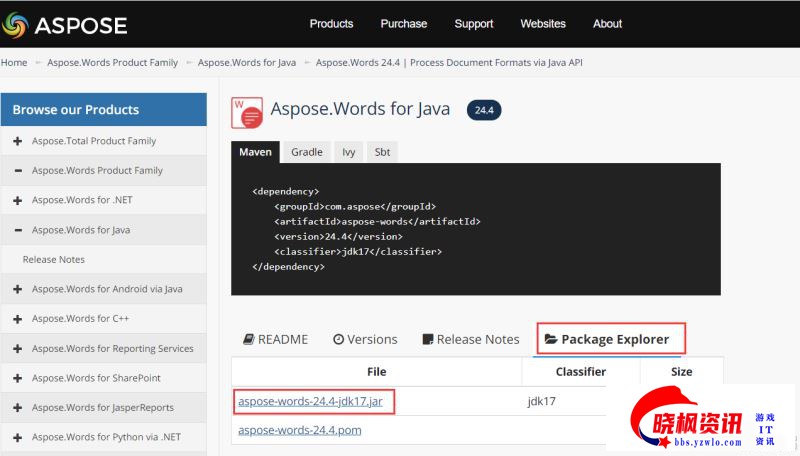
其中,aspose-words包不太好找,在阿里云镜像库中都没有,需要在网上下载后,上传到本地的私 服库,或者用上文中的方式直接在lib中加载。我在网上找了这个地址,可以查看和下载相关包:Aspose.Words 24.4
2、代码实现
将依赖包引入之后,编写以下Java代码:
- package com.leixi.fileTrans.utils;
-
- import com.aspose.words.SaveFormat;
- import java.io.BufferedWriter;
- import java.io.File;
- import java.io.FileInputStream;
- import java.io.FileOutputStream;
- import java.io.OutputStreamWriter;
- import com.aspose.words.Document;
- import org.apache.pdfbox.Loader;
- import org.apache.pdfbox.pdmodel.PDDocument;
- import org.apache.pdfbox.text.PDFTextStripper;
-
- /**
- *
- * @author leixiyueqi
- * @since 2024/08/26 19:39
- */
- public class FileTransUtils {
-
- public static void main(String[] args) throws Exception {
- File file = new File("D:\\upload\\SAAS.docx");
- String output = "D:\\upload\\SAAS.pdf";
- doc2pdf(file, output);
- System.out.println("测度结束");
- }
-
-
- public static void doc2pdf(File file, String outPath) throws Exception{
- FileInputStream fis = new FileInputStream(file);
- Document document = new Document(fis);
- if (!checkDirectory(outPath)) {
- throw new Exception("创建目录失败");
- }
- document.save(outPath, SaveFormat.PDF);
- System.out.println(String.format("WORD转换Pdf成功: %s", outPath));
- document.save(outPath.replace(".pdf", ".txt"), SaveFormat.TEXT);
- System.out.println(String.format("WORD转换Txt成功: %s", outPath.replace(".pdf", ".txt")));
- document.save(outPath.replace(".pdf", ".html"), SaveFormat.HTML);
- System.out.println(String.format("WORD转换html成功: %s", outPath.replace(".pdf", ".html")));
- pdfToTxt(new File(outPath), new File(outPath.replace(".pdf", "ByPdf.txt")));
- System.out.println(String.format("通过Pdf转换Txt成功: %s", outPath.replace(".pdf", "ByPdf.txt")));
- }
-
- public static boolean checkDirectory(String filePath) {
- File file = new File(filePath);
- if (file.isDirectory()) {
- return true;
- } else {
- File dir = file.getParentFile();
- if (dir != null && !dir.isDirectory() && !dir.mkdirs()) {
- System.out.println(String.format("创建目录%s失败:", dir.getAbsolutePath()));
- return false;
- } else {
- return true;
- }
- }
- }
- public static void pdfToTxt(File input, File output) {
- BufferedWriter wr = null;
- try {
- PDDocument pd = Loader.loadPDF(input);
- pd.save("CopyOf" + input.getName().split("\\.")[0] + ".pdf");
- PDFTextStripper stripper = new PDFTextStripper();
- wr = new BufferedWriter(new OutputStreamWriter(new FileOutputStream(output)));
- stripper.writeText(pd, wr);
- if (pd != null) {
- pd.close();
- }
- wr.close();
- } catch (Exception e) {
- e.printStackTrace();
- }finally {
- System.out.println("PDF转换Txt成功");
- }
- }
- }
3、测试
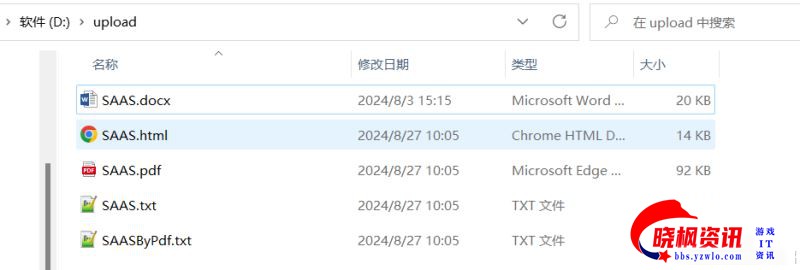
先创建一个WORD文件,放在d:\upload\文件夹下:
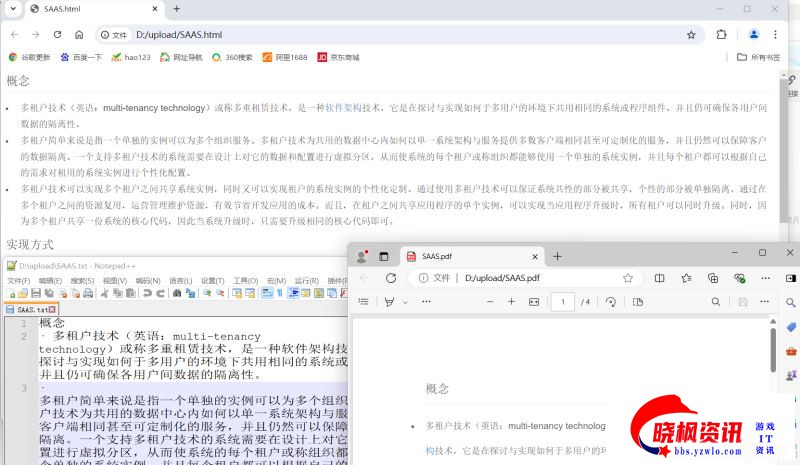
然后执行Java代码中的main方法,结果如下:
从结果来看,咱们的转换测试是非常成功的。
后记
这次的实践的成果还是十分有价值的,它不仅可以用于项目中,还可以应用于工作生活中,比如博主平常习惯看电子书,在网上收集到的很多资料都是PDF格式的,怎么办?用程序一转换就行了。
但不得不说的是,这只是一个非常初级的,学习性的Demo,实际在项目中,要想实现PDF转换为TXT或其他文件,其实十分麻烦。要针对PDF文件是文字居多,还是图片/表格居多,采用不同的办法;转换的时候,还要计算图片的偏转角度,去除水印,去除格式字符等诸多操作,十分繁琐。
以上就是SpringBoot实现Word转PDF和TXT的实践分享的详细内容,更多关于SpringBoot Word转PDF/TXT的资料请关注晓枫资讯其它相关文章! 免责声明:如果侵犯了您的权益,请联系站长,我们会及时删除侵权内容,谢谢合作! | 





 发表于 2024-9-26 20:59:08