1.说明
我们经常通过SSH终端发送shell命令进行服务器运维,从而获取到服务器的各种资源,按照这个思路,我们可以利用Java做一个定时任务,定时采集服务器资源使用情况,从而实现服务器资源的动态呈现。
2.封装SSH操作方法
首先我们定义SSH连接实体类。
- /**
- * SSH连接
- * @author Mr.Li
- * @date 2023-01-01
- */
- public class SshConnection {
- private String username;
- private String password;
- private String hostname;
-
- public SshConnection(String username, String password, String hostname) {
- this.username = username;
- this.password = password;
- this.hostname = hostname;
- }
-
- public String getUsername() {
- return username;
- }
-
- public String getPassword() {
- return password;
- }
-
- public String getHostname() {
- return hostname;
- }
- }
然后封装SSH命令操作方法
引入Jar包
- <dependency>
- <groupId>org.apache.sshd</groupId>
- <artifactId>sshd-core</artifactId>
- <version>2.8.0</version>
- </dependency>
-
- <dependency>
- <groupId>net.i2p.crypto</groupId>
- <artifactId>eddsa</artifactId>
- <version>0.3.0</version>
- </dependency>
- /**
- * SSH linux操作类
- * @author Mr.Li
- * @date 2023-01-06
- */
- @Slf4j
- public class SSHLinuxUtils {
-
- /**
- * 执行Shell命令并返回结果
- * @param conn
- * @param cmd
- * @param timeout
- * @return
- * @throws IOException
- */
- public static SshResponse runCommand(SshConnection conn, String cmd, long timeout) {
- SshClient client = SshClient.setUpDefaultClient();
- try {
- //Open the client
- client.start();
- //Connect to the server
- String hostIp="";
- Integer port=22;
- String [] hostArr=conn.getHostname().split(":");
- if(hostArr.length>1){
- hostIp=hostArr[0];
- port=Integer.parseInt(hostArr[1]);
- }else{
- hostIp=hostArr[0];
- }
- ConnectFuture cf = client.connect(conn.getUsername(), hostIp, port);
- ClientSession session = cf.verify().getSession();
- session.addPasswordIdentity(conn.getPassword());
- session.auth().verify(TimeUnit.SECONDS.toMillis(timeout));
- //Create the exec and channel its output/error streams
- ChannelExec ce = session.createExecChannel(cmd);
- ByteArrayOutputStream out = new ByteArrayOutputStream();
- ByteArrayOutputStream err = new ByteArrayOutputStream();
- ce.setOut(out);
- ce.setErr(err);
- //Execute and wait
- ce.open();
- Set<ClientChannelEvent> events =
- ce.waitFor(EnumSet.of(ClientChannelEvent.CLOSED), TimeUnit.SECONDS.toMillis(timeout));
- session.close(false);
- //Check if timed out
- if (events.contains(ClientChannelEvent.TIMEOUT)) {
- log.error(conn.getHostname()+" 命令 "+cmd+ "执行超时 "+timeout);
- }
- return new SshResponse(out.toString(), err.toString(), ce.getExitStatus());
- }catch (Exception e){
- log.error("runCommand:cmd:{}",cmd,e);
- return null;
- } finally {
- client.stop();
- }
- }
- }
3.执行Shell命令
连接服务器
- SshConnection sshConnection = new SshConnection("远程登录服务器用户名","远程登录服务器密码","远程登录服务器的IP端口");
以获取内存为例:
- //获取内存的命令
- String cmd="sudo cat /proc/meminfo";
- //执行获取当前内存的命令
- SshResponse sshResponse = SSHLinuxUtils.runCommand(sshConnection,cmd,3);
- //其中StdOutput为获取到的内存数据
- String outPut=sshResponse.getStdOutput();
获取负载与磁盘,则只需要经命令更换成如下命令即可
- //负载
- String cmd="sudo cat /proc/loadavg";
- //磁盘
- String cmd="sudo df -h";
4.效果呈现
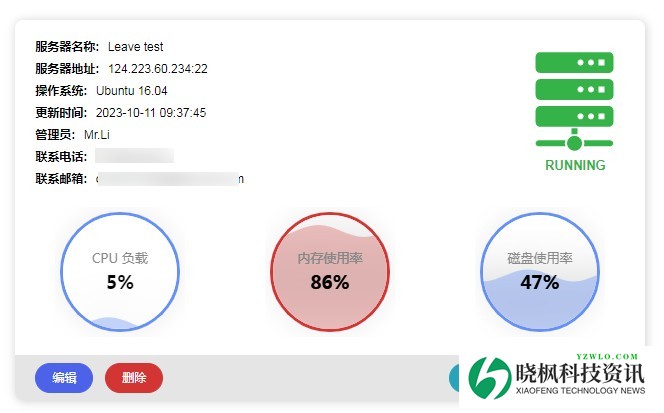
结合自己的业务,以及之前介绍的关于Supervisor监控服务的对接,我们可以完成一个简单的服务运维业务。
监控指标
进程监控
到此这篇关于Java实现获取服务器资源(内存,负载,磁盘容量)的文章就介绍到这了,更多相关Java获取服务器资源内容请搜索晓枫资讯以前的文章或继续浏览下面的相关文章希望大家以后多多支持晓枫资讯! 免责声明:如果侵犯了您的权益,请联系站长,我们会及时删除侵权内容,谢谢合作! | 





 发表于 2025-8-27 20:26:27