在 Linux 设备驱动模型中,总线(Bus)是连接处理器与设备的桥梁,而 Platform 总线是一种虚拟总线,专门用于管理那些不依赖于物理总线(如 I2C、PCI、USB 等)的嵌入式设备(如 SoC 内部的硬件外设)。
所以platform 总线的主要作用就是统一设备模型,将未挂载到物理总线的设备纳入统一的设备驱动框架。
通过 platform_bus_type 虚拟一条总线,使得这些设备可以像物理总线设备一样被管理。
platform驱动注册
结构体是struct platform_driver,主要包含probe、remove等接口。
- struct platform_driver {
- int (*probe)(struct platform_device *);
- /*
- * Traditionally the remove callback returned an int which however is
- * ignored by the driver core. This led to wrong expectations by driver
- * authors who thought returning an error code was a valid error
- * handling strategy. To convert to a callback returning void, new
- * drivers should implement .remove_new() until the conversion it done
- * that eventually makes .remove() return void.
- */
- int (*remove)(struct platform_device *);
- void (*remove_new)(struct platform_device *);
- void (*shutdown)(struct platform_device *);
- int (*suspend)(struct platform_device *, pm_message_t state);
- int (*resume)(struct platform_device *);
- struct device_driver driver;
- const struct platform_device_id *id_table;
- bool prevent_deferred_probe;
- /*
- * For most device drivers, no need to care about this flag as long as
- * all DMAs are handled through the kernel DMA API. For some special
- * ones, for example VFIO drivers, they know how to manage the DMA
- * themselves and set this flag so that the IOMMU layer will allow them
- * to setup and manage their own I/O address space.
- */
- bool driver_managed_dma;
- };
驱动注册接口是platform_driver_register,主要是把bus配成platform_bus_type后调用driver_register注册。
代码示例:
- int zsl_drv_probe(struct platform_device *dev)
- {
- struct property *pp = NULL;
- printk(KERN_INFO "%s: \n",__func__);
- dump_stack(); // 打印堆栈
- return 0;
- }
- int zsl_drv_remove(struct platform_device *dev)
- {
- printk(KERN_INFO "%s: \n",__func__);
- return 0;
- }
- struct platform_driver zsl_drv =
- {
- .driver =
- {
- .name = "zsltest",
- },
-
- .probe = zsl_drv_probe,
- .remove = zsl_drv_remove,
- };
再使用platform_driver_register(&zsl_drv)注册这个驱动。
platform设备注册
结构体是struct platform_device,主要包含probe、remove等接口。
- struct platform_device {
- const char *name;
- int id;
- bool id_auto;
- struct device dev;
- u64 platform_dma_mask;
- struct device_dma_parameters dma_parms;
- u32 num_resources;
- struct resource *resource;
- const struct platform_device_id *id_entry;
- /*
- * Driver name to force a match. Do not set directly, because core
- * frees it. Use driver_set_override() to set or clear it.
- */
- const char *driver_override;
- /* MFD cell pointer */
- struct mfd_cell *mfd_cell;
- /* arch specific additions */
- struct pdev_archdata archdata;
- };
注册接口是platform_device_register,主要是把设备属性填充后,后调用device_add注册。
代码示例:
- struct platform_device zsl_dev =
- {
- .name = "zsltest",
- .dev =
- {
- .release = zsl_dev_release,
- },
- };
再使用platform_device_register(&zsl_dev)注册这个设备,其中zsl_dev里的name和zsl_drv的name保持一样,才能让platform device和platform driver匹配上,从而调用zsl_drv.probe。
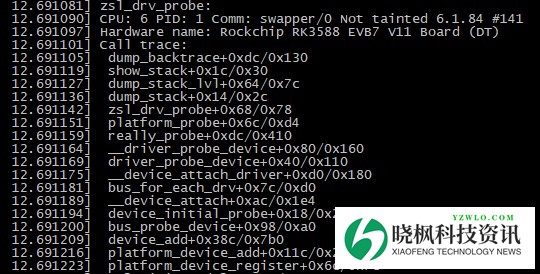
跟platform驱动注册配套使用后,运行打印如下,可以看到zsl_drv.probe会被调用到。
运行结果:
设备树
支持设备的内核里,更推荐使用设备树的方式,而不是platform设备注册的方式。
去掉zsl_dev设备的注册代码,在zsl_drv变量里增加.of_match_table = zsl_of_match,并且zsl_of_match表里增加.compatible = "rockchip,zslzsl",然后在设备树里增加以下代码。
保持两边的compatible一致,并且status是okay的。
这样就会调用zsl_drv.probe,并且可以拿到设备树里的属性内容。
- zsl: zsl {
- compatible = "rockchip,zslzsl";
- status = "okay";
- testdata = "test";
- };
如下修改zsl_drv_probe接口,增加拿testdata属性的代码
- int zsl_drv_probe(struct platform_device *dev)
- {
- struct property *pp = NULL;
- printk(KERN_INFO "%s: \n",__func__);
- pp = of_find_property(dev->dev.of_node, "testdata", NULL);
- if (pp)
- printk(KERN_INFO "%s: %d:%s \n",__func__,pp->length,(char *)pp->value);
- dump_stack(); // 打印堆栈
- return 0;
- }
编译运行后如下,可以看到zsl_drv.probe会被调用到,并且能拿到设备树里的testdata属性。
Platform驱动和设备的关系
根据堆栈打印跟踪代码,调用调用关系如下
- platform_driver_register
- driver_register
- bus_add_driver
- klist_add_tail
- driver_attach
- driver_match_device(struct device *dev, void *data)=platform_match(struct device *dev, struct device_driver *drv) //找dev
- driver_probe_device
- really_probe
- dev->bus->probe=platform_probe
- drv->probe=zsl_drv_probe
Driver注册时通过bus_add_driver将driver加入总线(klist_add_tail到总线的driver列表),触发driver_attach,遍历总线的device列表,通过platform_match匹配已有设备。
基本就是按顺序对设备树、id_table name的字符串匹配。匹配成功后,通过really_probe调用总线默认的platform_probe,最终执行driver的probe函数。
- platform_device_register
- platform_device_add
- device_add
- bus_probe_device
- device_initial_probe=__device_attach
- __device_attach_driver
- driver_match_device(struct device *dev, void *data)=platform_match(struct device *dev, struct device_driver *drv) //找drv
- driver_probe_device
- really_probe
- dev->bus->probe=platform_probe
- drv->probe=zsl_drv_probe
- klist_add_tail
Device注册时通过device_add将device加入总线(klist_add_tail到总线的device列表)触发bus_probe_device,遍历总线的driver列表,通过platform_match匹配已有驱动,匹配成功则调用driver的probe函数。
这种双向注册机制确保了无论driver和device的注册顺序如何,都能正确触发匹配和初始化。
总结
以上为个人经验,希望能给大家一个参考,也希望大家多多支持晓枫资讯。
免责声明:如果侵犯了您的权益,请联系站长,我们会及时删除侵权内容,谢谢合作!





 发表于 2025-8-29 22:38:43